In-game overlay list
The in-game overlay (Ctrl+Shift+K by default while a supported game runs) shows the
achievement list of the running game without leaving it: names, descriptions,
lock state, unlock dates and progress. The window is draggable by its header
and stays on top of the game. On Linux, a game running natively under Wayland does not pass the
hotkey on: bind ~/.local/bin/achievement-watcher --toggle-overlay to a key instead, as
Overlay shortcut shows.
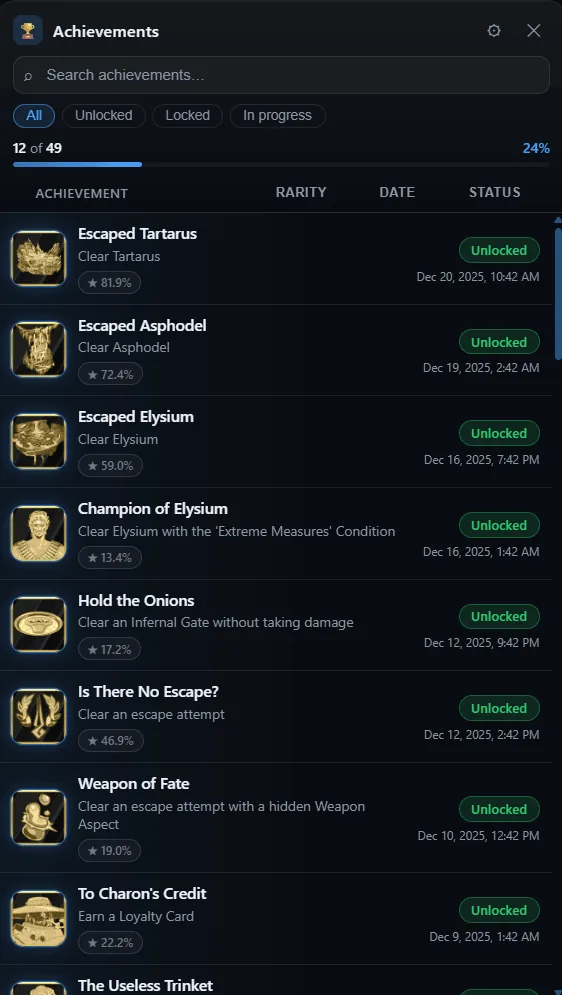
Status, rarity and date columns, with search and filters
On this page
What it shows
- A stats bar with
unlocked / totaland the completion percentage. - One row per achievement with a colored status pill
(
Unlocked/Locked), the unlock date for earned achievements, and a progress bar +current / maxlabel for progress achievements. - A community-rarity badge (
★ 12.3%) for every achievement with a known unlock rate (Epic/GOG official schemas and emulator sidecars). Common achievements use a dark-gray badge; rare ones use gold (≤5%), silver (≤10%) and bronze (≤15%) with a soft halo.
Hidden achievements
The overlay does not spoil a hidden achievement you have not unlocked yet: its description reads Hidden - click to reveal, as in the main window. Click it - or press A on a controller - to reveal that one description. Search ignores descriptions that are still masked.

Before and after a click on “Ohhhhhh! That hurt!”: only that description is revealed
Search and filters
- The search box filters rows by achievement name and description as you type.
- The pills above the list switch between All, Unlocked, Locked and In progress.
- Clicking the Rarity, Date or Status column header sorts ascending, then descending, then back to the natural order. Only one column sorts at a time, so activating another column resets the rest.
- Press
/to focus the search box andEscto clear it (or close the options panel if it is open).
Controller (gamepad)
The overlay can be driven entirely from a controller once Control the in-game overlay with a controller is enabled in Settings → Controller. With the default bindings:
- Back + Start + LB opens or closes the overlay.
- LB + X toggles navigation mode - a focus ring shows where you are, and a small UI badge appears in the overlay header.
- In navigation mode: D-pad or left stick move the focus, A confirms, B cancels, X focuses the search, Y opens the options panel.
- Holding LB + RB moves the overlay with the left stick and scrolls the list with the right stick.
Every shortcut is configurable, button names follow the layout you pick, and the overlay’s hint bar always shows your own bindings rather than these defaults. The controller guide covers the settings, the supported pads and the Windows caveat about the game still seeing your button presses.
Customization
Open the ⚙ button in the overlay header to customize the list:
- Accent - five color presets, a custom color picker, or Use app theme to follow the main window’s theme instead (used for progress, active filters, focus rings and unlocked-row glow).
- Density - Compact, Cozy or Spacious row spacing.
- Icon size - Small, Medium or Large.
- Zoom - 80% to 125% of the panel size.
- Opacity - 40% to 100% of the panel’s background.
- Show/hide toggles for the stats bar, progress bars, rarity badges and descriptions.
Changes apply immediately and are saved locally, so they survive closing and reopening the overlay. Reset defaults restores the original look.
Keyboard shortcuts (overlay open)
Ctrl+Alt+Shift+Arrows- nudge the overlay window.Ctrl+Alt+Shift+1…5- snap to a preset position.Ctrl+Alt+Shift+C- toggle click-through.
Notes
- The overlay follows the interface language selected in the app.
- After the first open, the overlay window is kept hidden and reused for 5 minutes, so toggling it again during a session is near-instant; while hidden it pauses its controller/gamepad polling and the window is released after 5 minutes of inactivity to free its memory.
- Row content is escaped before rendering; achievement data is only displayed, never executed.
- The overlay list is separate from the one-shot overlay notification presets (Settings → Notification). Preset appearance is configured there.
Next: Controller guide - drive the overlay and the app with a gamepad.